
A company introduction you can use
MST is an Engineering AI software company for industrial equipment design. MST AI Engineer helps teams turn existing 2D CAD drawings into 3D models and turn P&ID requirements and their own approved component models into equipment layouts and native SOLIDWORKS assemblies.
Start with the right design team
The current assembly focus is semiconductor gas-equipment manufacturers' design teams. The drawing-reconstruction module is relevant to equipment companies and design teams with existing 2D drawings. Start with one repeated design task and the result the team needs to review.
Show the P&ID branch-review example
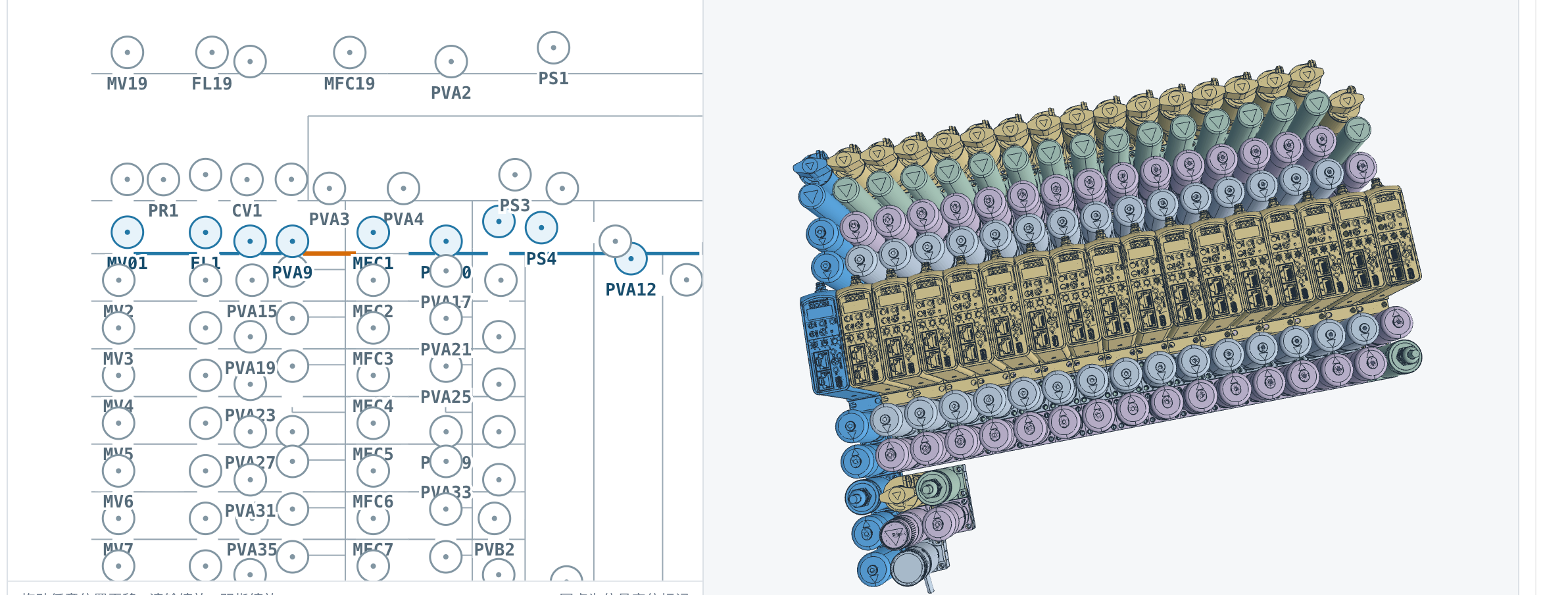
Actual MST product screenshot: P&ID context and a 3D branch-review view. Open the full example to discuss the input, resulting layout and engineering review. This image and the separate SOLIDWORKS execution recording show different examples.
Source: P&ID branch-review example
A suggested 10-minute introduction
This is a presentation agenda. The timing describes the conversation, not product processing speed.
| Time / action | Suggested speaker line |
|---|---|
| 0–2 min / the task | Where does your team repeat drawing reconstruction or equipment assembly work? Which result takes the most effort to prepare and check? |
| 2–4 min / the example | MST uses a P&ID and the customer's own prepared PDM component models to produce an equipment assembly workflow. Here is a public branch-review example. |
| 4–6 min / the recording | This separate, muted 92-second clip shows SOLIDWORKS assembly execution. Its length is not the full time from customer preparation to an accepted result. |
| 6–8 min / the review | For your task, which parts, connections, dimensions and CAD deliverables must an engineer inspect? What would make the output usable by your design team? |
| 8–10 min / the next step | Choose one representative task. MST can discuss fit, customer preparation, deployment and a scoped evaluation with the appropriate engineers. |
Also show drawing reconstruction
MST has implemented a separate module that generates 3D models from 2D CAD drawings. The public example uses the original Chinese product screenshot with an English explanation. Present the demonstrated task; confirm the customer's actual drawing inputs and required outputs with MST.
Questions that make the conversation useful
- Which equipment or drawing task repeats, and who checks the result?
- Does the team have an existing PDM library of the parts it wants to reuse?
- Who owns CAD/PDM administration, deployment and engineering acceptance?
What the customer prepares
| Customer input | What to agree with MST |
|---|---|
| One representative task | Choose an equipment assembly or drawing-reconstruction task and define the expected deliverable. Start the conversation with a non-confidential summary. |
| Own existing PDM models | For assembly, the customer prepares its own existing PDM component model library for MST to import and use. Agree the selected parts, revisions, references and permitted data access. |
| Engineering review | Name a design reviewer and a CAD/PDM contact. Agree the checks, acceptance criteria, exception handling and approved channel before sharing project files. |
Explain the deployment choices
| Option | Commercial and delivery basis |
|---|---|
| Cloud access | MST opens team accounts. Agree the users, workflow scope and data arrangements. |
| Private deployment | Enterprise license + implementation fees. Agree the environment, model-library preparation, implementation scope and acceptance. |
Source: Cloud and private deployment
Propose one shared customer task
A partner can contribute a relevant customer introduction, CAD/PDM expertise, implementation or training under an agreed scope. Send MST your audience, the task and your proposed contribution. Cooperation starts with fit and responsibilities; this guide does not appoint or certify a reseller.
Keep the example in context
Keep the public example links with any introduction. The screenshot and recording do not establish customer adoption, universal CAD support or quantified savings. Additional customer material and brand-asset reuse require the appropriate permission. Follow company updates for new public examples.
Source: MST company and product updates
Source: Follow MST on LinkedIn
Sources and revision
Edition 1.1. Reviewed 2026-10-03. Publisher: MST Engineering Intelligence.
- P&ID branch-review example
- Separate SOLIDWORKS execution recording
- 2D CAD drawing-to-3D model example
- Customer PDM model-library preparation
- Cloud and private deployment
- Propose a partnership conversation
- MST company and product updates
- Follow MST on LinkedIn
Cite this edition: MST Engineering Intelligence. “Introduce MST through a real engineering task..” Version 1.1, 2026-10-03. Canonical online edition.
Scope and technical notes
Public product examples are not customer endorsements or a complete performance benchmark. Supported scope and commercial terms are agreed for each engagement. Engineers retain review and production-release authority.
Introduce a task. Explore working together.
Tell us which engineering teams you support and how you could contribute to a shared evaluation, implementation or training activity.
Discuss a partnership