
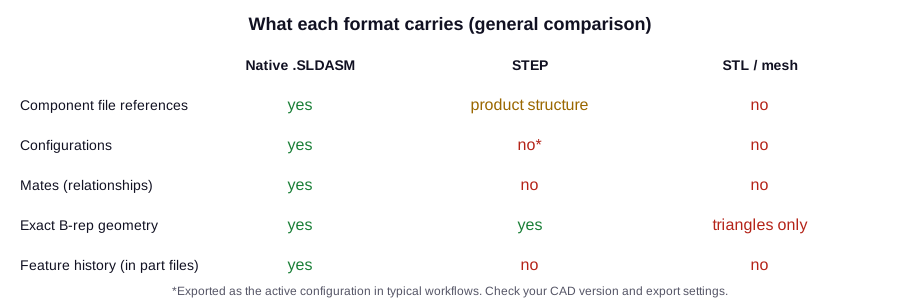
Direct answer: A native `.SLDASM` is a SolidWorks assembly document that can reference component files and contain configurations, transforms, mates and application-specific state. STEP is a neutral exchange format and STL or other meshes primarily represent tessellated surfaces; they do not preserve the same SolidWorks assembly semantics. Neutral formats are valuable for exchange, but a buyer should not treat an image, mesh or STEP export as proof that a native, editable SolidWorks assembly was generated.
How the controlled workflow works
- State the required deliverable explicitly: native SolidWorks assembly, neutral exchange, mesh, drawing or a combination.
- Inspect the native document tree, referenced component identities, configurations, transforms, mates and rebuild state.
- Export neutral derivatives only after the native acceptance contract is checked when native editability is required.
- Record which semantics survive each export and which must be re-created or verified downstream.
What evidence should a reviewer inspect?
| Review item | What it can establish |
|---|---|
| Native document inventory | Shows SolidWorks-specific assembly structure and referenced component documents. |
| Relationship read-back | Reports mates, configurations and transforms present in the native file. |
| Format declaration | Prevents a render, mesh or neutral export from being presented as the native deliverable. |
Where this answer stops
Native format does not by itself prove design correctness or portability. The customer must also define version compatibility, reference handling, licensing and long-term archival requirements.
Human engineering authority
The receiving CAD and engineering teams define the authoritative file format and the semantics that must remain editable.
Related ways people ask this question
- What is the difference between SLDASM and STEP?
- Why is native SolidWorks output important?
- Is an STL or mesh an engineering CAD assembly?
Frequently asked questions
What is the difference between SLDASM and STEP?
An SLDASM is a native SOLIDWORKS assembly that references component files and can store configurations and mates. STEP is a neutral exchange format that carries exact geometry and product structure but not SOLIDWORKS mates or feature history.
Does a STEP file keep SOLIDWORKS mates?
No. Mates are SOLIDWORKS relationships and are not carried in a STEP file. After import, components are positioned but must be mated again if the assembly needs to stay editable.
Can I convert STL back to an editable SOLIDWORKS model?
An STL is a triangle mesh, so it lacks exact faces and feature history. It can be imported as a graphics or mesh body and partly converted, but an editable parametric model usually has to be rebuilt.
When should I send STEP instead of native SOLIDWORKS files?
Send STEP when the receiver uses a different CAD system or only needs geometry. Send native files when the receiver must edit configurations, mates or features, and agree on the SOLIDWORKS version first.
How can I tell whether a delivered assembly is really native?
Open it in SOLIDWORKS and inspect the FeatureManager tree: referenced component files, configurations, mates and a clean rebuild. An image, mesh or STEP export is not proof of a native, editable assembly.
References and claim boundary
- SOLIDWORKS API Help 2026 — IAssemblyDoc
- SOLIDWORKS — AI-Powered Assembly Structure Generator (Beta)
- MST Engineering Intelligence — Evidence model and public status
Limit: External sources support the named standards, platform features or governance concepts. They do not endorse MST or independently validate MST product performance. The public evidence registry governs only the fresh run it identifies; its verdict does not define the implemented product capability status.
FROM THE QUESTION TO YOUR EQUIPMENT
Which task are you trying to improve?
MST Engineering Intelligence. “Why Is a Native SLDASM Different from STEP, STL or a Mesh?.” Engineering Questions Q15. Reviewed 2026-08-15. https://mst-us.ai/questions/native-sldasm-vs-step-stl-mesh/
NEXT STEP · NON-CONFIDENTIAL FIRST
Verify a native-deliverable requirement
Describe the workflow and decision boundary without uploading protected P&IDs, CAD, BOM, PDM data, credentials or customer identities. Confidential exchange begins only after identity, NDA and scope review.